If they can take a photo, they can do the books.
The Android app puts capture where the paper is. Whoever takes the delivery photographs the bill; your bookkeeper checks the draft it comes back as. No training, no chart of accounts, no laptop.
The whole job, on a phone
Three screens, start to finish
This is the app, not a mock-up of it. Sandbox books, but the real screens.
01Pick whose books it goes into
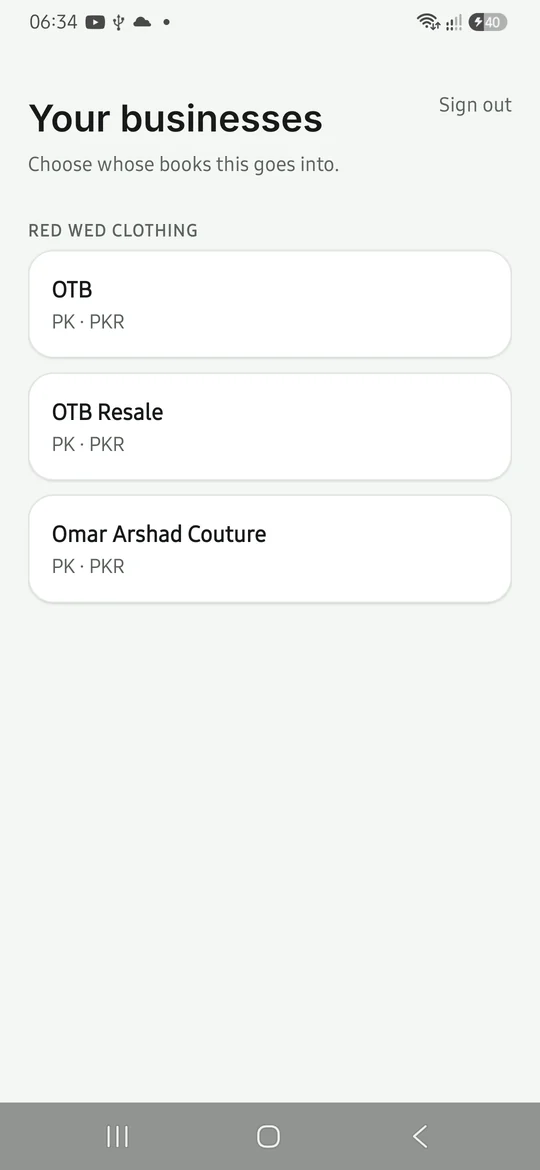
Businesses are grouped under their holding company, because the same name can exist in two groups. Getting this right takes one tap and saves somebody an afternoon of unpicking.
02Snap it, or pick from the gallery
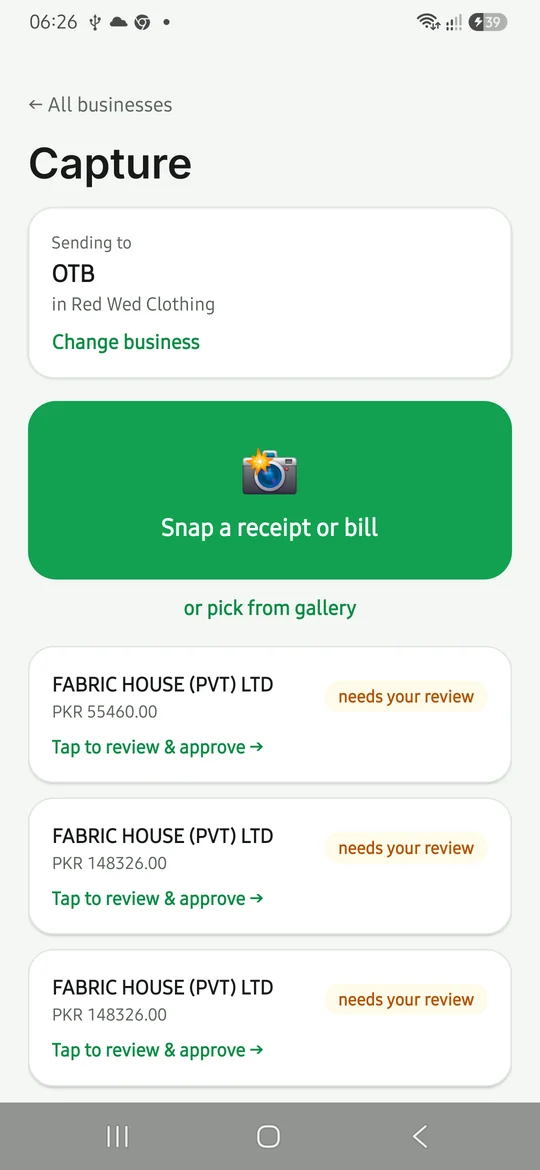
One big button. Photograph the bill on the counter, or upload a photo somebody already sent you on WhatsApp. It starts being read straight away, and the list tells you plainly where each one has got to.
03Check what it read, then approve
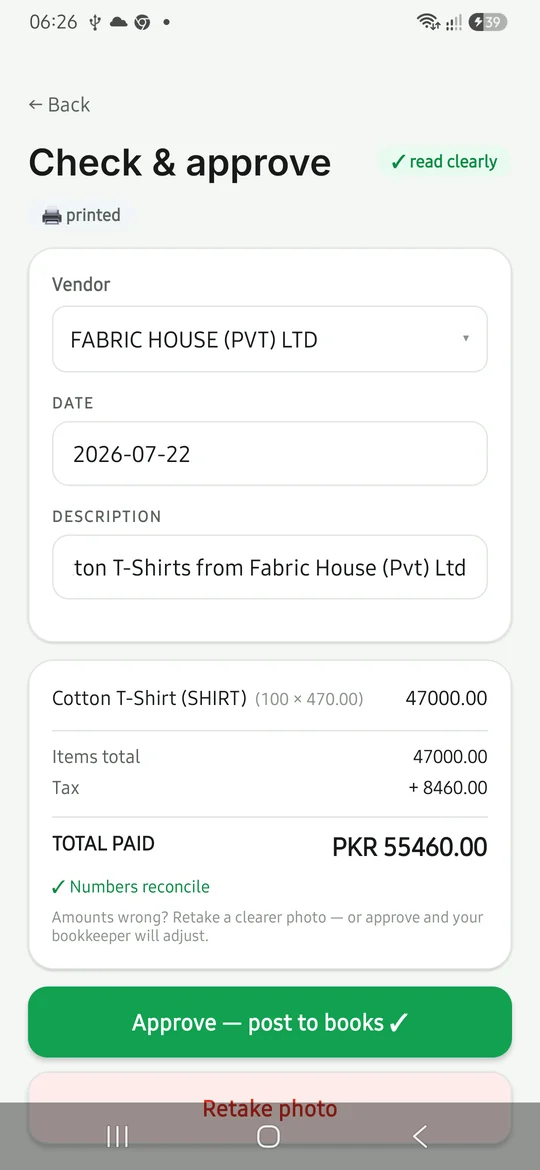
Supplier, date, every line, tax and the total — all on screen against the original. The app checks its own arithmetic and says so. Approve, and it is in the books.
Easy enough for everyone
Built for the person at the counter, not the accountant
Most accounting software assumes the person using it understands accounting. The capture app assumes the opposite — and that is why the paperwork actually gets captured.
- No accounting knowledge requiredThe person photographing the bill never sees a chart of accounts, a debit or a credit. They pick the business and press the button. The coding happens behind them and the bookkeeper checks it.
- It says where things stand, in words“Preparing entry…”, “needs your review”, “approved ✓”. No status codes, no jargon. If something got stuck it says “stuck — tap to retry” rather than sitting there looking finished.
- A bad photo is not a problemThe app tells you when it read the document clearly. When it did not, retake it — or approve anyway and let the bookkeeper adjust. Its own words: “Amounts wrong? Retake a clearer photo — or approve and your bookkeeper will adjust.”
- It asks for the camera. Nothing else.Camera and photos, and the microphone permission is switched off deliberately. Staff are asked to install one thing that does one thing.
What comes off the page
Not just the total
A total alone is a receipt in a folder. The whole document is read, so the entry behind it is a real entry rather than a lump sum somebody codes later.
The supplier
Matched against your real contact list, or added to it — not typed free-hand into a field.
The date
Read from the document, and booked into the right period.
Every line
Description, quantity and unit price, line by line, not rolled into one figure.
The tax
Separated out, so input tax lands where it belongs.
The total
And a check that the lines plus tax actually add up to it.
The document itself
Attached to the entry, so any figure can be traced back to the paper.
Why this is not the OCR bolt-on you have seen before
Most systems scan the document. Then they hand you a queue.
On the desktop the screen that does this is called Checkpoint — entry on the left, the photograph on the right, zoom and drag to read the small print.
What it changes
Faster, cheaper, and easier to defend
Time goes to checking, not typing
The slow part of bookkeeping was never the thinking — it was keying a fifteen-line purchase invoice off a crumpled page. That part is done before your bookkeeper opens it.
The same team handles more books
When entry stops being manual, a bookkeeper stops being a typist. The hours you already pay for go to reconciliation, review and the questions that need a person.
Figures come off the document
The amounts are read from the page rather than remembered from it, and the page stays attached to the entry — so a number can always be traced back to the paper it came from.
How much time this saves depends on how much paper you handle — a trading business putting through forty supplier bills a month feels it differently from a boutique with four. Bring a month of your own paperwork to the call and judge it on your volumes rather than ours.
Bring a bill you have not entered yet
We will scan it on the call, on a phone, and you can watch the entry come back.